Recent Posts

Stats

Get Apps Deliverd To Your Email

Pages

Blogger Themes

Site Map

Advertise

Moto GP News

Football News

Formula 1 News

Pages

Sport News

Popular Posts

Search This Blog

Showing posts with label Pc Sharewares. Show all posts

Tuesday, 1 February 2011

XYplorer 9.90.0200 (A Windows File Manager & Explorer Replacement)

XYplorer is a multi-tabbed dual pane file manager for Windows, featuring a powerful file search, a versatile preview, a highly customizable interface, and a large array of unique ways to efficiently automate frequently recurring tasks. It's extremely fast and light, it's innovative, and it's fun!

Change Log in XYplorer 9.90.0200 (31-Jan-2011):
- Junctions and Symbolic Links. Support for creating junctions and symbolic links.
- Bug fixes.


Thursday, 15 July 2010

video Edit Magic v4.34 (A Nice Video Editor)

video Edit Magic v4.34

Video Edit Magic makes it easy to join, split, crop, trim, modify color, and merge your video files. It includes more than 150 built-in transitions, making it ideal for hobbyists and professionals to turn ordinary videos into works of art. A unique benefit of Video Edit Magic is the volume track which is displayed as a volume graph allowing you to change the volume of audio clips at any point from 0% to 400%. You can create fade-ins, fade-outs, Doppler effects, and almost any volume effect that may have required predefined effects.

Most of the commonly used media file formats are supported by Video Edit Magic: AVI, WAV, Windows Media Audio (WMA), Windows Media Video (WMV), Advanced Streaming Format (ASF), Motion Picture Experts Group (MPEG), Audio-Video Interleaved (AVI), QuickTime (MOV), AIFF, AU, SND.
In addition to video and audio sources, Video Edit Magic also supports the following image file formats: Bitmap (.bmp), GIF (Graphics Interchange Format), JPEG (Joint Photographic Experts Group), TGA (Targa or Truevision Graphics Adapter), Mode 2 (uncompressed RGB) in 16-bit, 24,-bit, or 32-bit formats.

Supported Output Formats : AVI, MPEG Formats (VCD, SVCD and DVD), Windows Media Video, Windows Media Audio, Digital Video AVI, QuickTime.

With Video Edit Magic you can:
- Capture videos using any USB or FireWire input device.
- Edit the audio and video components of a single media file separately.
- Give effects to your videos.
- Decorate your videos with more than 150 unique transitions.
- Overlay one video over another.
- Make movies in AVI, MPEG, WMV, WMA, QuickTime, and DV AVI.
- Add a background score/voiceover to your video file.
- Join multiple media files together.
- Combine multiple file formats on the same timeline.
- Incorporate text titles in your videos.
- Trim your videos and audios.
- Create VCD and DVD format files.
- Change the color and contrast.
- Zoom or rotate video angle.
- Export your videos to any Digital Video Camera.

OS: Windows 98 SE/ME/2000/XP/Vista

Wednesday, 7 July 2010

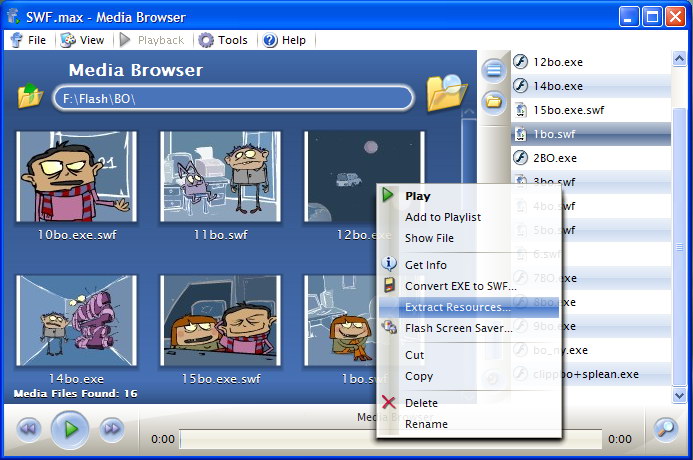
SWF.max Flash Player| Advanced Flash Movie Player for Windows


  •  Play Flash Movies, Flash Games and Control Playback like these were ordinary videos.
  • Browse and organize your Flash Movies using a built-in Media Browser. Thumbnails make it easier.
  • Create and save Flash Playlists.
  • Play or demonstrate your Flash Movies in Full Screen mode.
  • Play any kind of flash file types like Flash (SWF), Flash projector (EXE) and Flash Video (FLV).
  • Set your Flash movies as a Screen Saver or Interactive Animated Wallpaper.
  • Convert Flash Movies to Flash Projectors and vice versa. Projectors created are smaller than ordinary ones!
  • Generate thumbnails for your Web Site using Flash Thumbnail Generator.
  • Automate tasks using Command Line scripting

Monday, 26 April 2010

Internet Download Manger 5.18 build 8

 All popular browsers and applications are supported!

 Download Speed Acceleration.
Internet Download Manager supports all popular browsers including IE, AOL, MSN, Mozilla, Netscape, Firefox, Avant Browser, and many others. Internet Download Manager supports all versions of all popular browsers, and it can be integrated into any Internet application to take over downloads using unique "Advanced Browser Integration" feature.
 

Internet Download Manager can accelerate downloads by up to 5 times due to its intelligent dynamic file segmentation technology. Unlike other download managers and accelerators Internet Download Manager segments downloaded files dynamically during download process and reuses available connections without additional connect and login stages to achieve best acceleration performance.
 Easy downloading with one click.

 Download Resume.
When you click on a download link in a browser, IDM will take over the download and accelerate it. You don't need to do anything special, just browse the Internet as you usually do. IDM will catch your downloads and accelerate them. IDM supports HTTP, FTP, HTTPS and MMS protocols.

Internet Download Manager will resume unfinished download from the place where they left off. Comprehensive error recovery and resume capability will restart broken or interrupted downloads due to lost or dropped connections, network problems, computer shutdowns, or unexpected power outages.
 YouTube grabber.

 Simple installation wizard.
Internet Download Manager can record and download FLV videos from popular sites like YouTube, MySpaceTV, and Google Video. The best way of downloading webpage embedded videos from the Internet is here. After installing IDM, "Download This Video" button pops up whenever you are watching a video anywhere in the Internet. Just click on the button to start downloading clips.
 

Quick and easy installation program will make necessary settings for you, and check your connection at the end to ensure trouble free installation of Internet Download Manager
 Automatic Antivirus checking.

 Built-in Scheduler.
Antivirus checking makes your downloads free from viruses and trojans. IDM can automatically run a scanner on download completion, like AdAware, Avast, Spybot, AVG Anti-Virus, McAfee, SpywareBlaster, CCleaner and others to protect users from harmful downloaded files.
 

Internet Download Manager can connect to the Internet at a set time, download the files you want, disconnect, or shut down your computer when it's done. You can also synchronize changes using periodic synchronization of files. It's possible to create and schedule several download queues for downloading or synchronization.
 Drag and Drop.

 Advanced Browser Integration.
You may simply drag and drop links to IDM, and drag and drop downloaded files out of Internet Download Manager.

When enabled, the feature can be used to catch any download from any application. None of download managers have this feature.
 IDM includes web site spider and grabber.

 Customizable Interface.
IDM downloads all required files that are specified with filters from web sites, for example all pictures from a web site, or subsets of web sites, or complete web sites for offline browsing. It's possible to schedule multiple grabber projects to run them once at a specified time, stop them at a specified time, or run periodically to synchronize changes.

You may choose the order, buttons, and columns to appear on the main IDM window. There are several different skins for the toolbar with different button styles. All skins can be downloaded from IDM home site. Also users can design their own skins.
 
 IDM supports many types of proxy servers.

 IDM supports main authentication protocols: Basic, Negotiate, NTLM, and Keberos.
For example, IDM works with Microsoft ISA, and FTP proxy servers.
 

Thus IDM can access many Internet and proxy servers using login name and password.
 Download All feature.

 Download limits.
IDM can add all downloads linked to the current page. It's easy to download multiple files with this feature.
 

Progressive downloading with quotas feature limits downloading to defined number of megabytes per hour. The feature is useful for connections that use fair access policy (or FAP) like Direcway, Direct PC, Hughes, etc.
 IDM is multilingual.

 Quick Update Feature.
IDM is translated to Albanian, Arabic, Azerbaijan, Bosnian, Bulgarian, Chinese, Croatian, Czech, Danish, Dutch, Farsi, French, German, Greek, Hebrew, Hungarian, Italian, Japanese, Korean, Lithuanian, Macedonian, Norwegian, Polish, Portuguese, Romanian, Russian, Serbian, Slovak, Slovenian, Spanish, Thai, Turkish, and Uzbek languages.

Quick update may check for new versions of IDM and update IDM once per week. Quick updates feature lists all new features added to the latest version and asks a user if he wants to update IDM to the latest version.
 
 Download Categories.


Internet Download Manager can be used to organize downloads automatically using defined download categories.

Wednesday, 14 April 2010

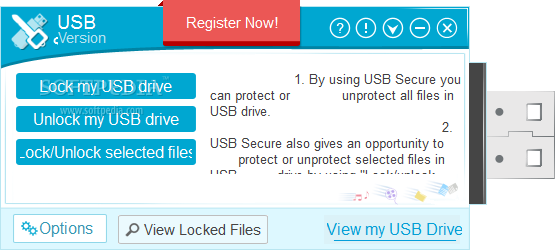
Usb Secure


USB Secure can password protect USB drive. Protection is PC independent, doesn't require installation and doesn't require administrator rights at the other end. Never again worry about lost or stolen USB drives if you have protected it with USB Secure. USB Secure works with all types of portable media like USB Flash drives, Thumb drives, Memory sticks, External drives and Memory Cards.